04 December 2008

What I miss from Siebel 6.0

I know that this title makes some people shudder. Siebel 6.0, they say, is only perfect as a historical showpiece. I beg to differ, at least till the time required to complete this post. Sure, I agree that Siebel 7 revolutionized things around here. If something is not browser based, I would not be taking any bets on the application mortality. Nevertheless, this should no way undermine the beauty of v6.0 application.

Release in the year 2000, v6.0 aka Siebel 2000, brought in more stability and looked better than the earlier versions. Also significant was the concept of “integrated channel management” – one application to manage your sales, marketing and customer service across channels incl. web, wireless and call center. A few features mentioned below makes one fondly remember of v6.0:

  • First and foremost aspect - the architecture, client-server worked like a charm. No IE, no fuss, no security concerns and no worrying about the next security patch killing everything except the manager. No worrying about different components that are at the mercy of different machines and operating systems
  • Performance – Any Siebel 6.0 developer would laugh off performance testing and happily do some more customization
  • Less network bandwidth – Everyone used local mode most of the time and everything ran on the local machine anyway. Even when you are connected to server you only need to ferry the data between application and db
  • Deployment bandwidth – Deploy with zero downtime – of the local application that is. Take your own sweet time to bring up the server and let the users synchronize over the following week
  • Usability – Responsive, access all available views through the menu (who says Sitemap is the right way?), an intuitive search and lesser screen refreshes – try navigating to the next set of records in a list
  • Looks – Apply windows theme and change the application looks, customize it to work on VGA or revert to the way v99 looked. Also, show or hide gridlines, alternate row background colours and customize your tool bar (through options set at the individual level, not through Tools)
  • Extendibility – You want anything not supported OOB? – just write some script, no worrying about server/browser scripting and the server-client round trips


Sure, there are not many points - v6.0 was no match for the "CEM" attitude of today. But for a time it did successfully held & expanded the forte of Siebel through the 'difficult' period for IT in the year 2000. All said, I have no love lost with the latest and greatest v8.0. After working on v6, albeit for a short time, I enjoyed the transition into the web & party model of 7 (& the accompanying hiccups - it generated lot of work :)), the robustness of 7.5, all the extras in 7.8 (still think it should have been the next BIG version of Siebel) and the user friendliness and wow-so-many-features that symbolises 8.0. And yes, all hail Fusion - I will be ready for it, whenever it comes!

Spying with Web 2.0!

As an IT consultant and business IT process evangeliser, do you think you have the toughest role in managing information? Do you think you have a big problem in your hands in getting your team to "talk to each other" and believe all your problems would just vanish if there is effective dessimation of information? If yes, you need to go through the ten pages of gruelling information sharing problems faced by the defence agencies in United States. Chances are you have been through it, but I recently stumbled on this article and wanted to share that in this space. With the dynamic and ever-changing face of today's terrorism, what one can do in terms of harnessing collective intelligence to put up an effective counter-strategy?

The story gives an interesting anacedotes on what was happening circa Sep-2001 and what is relevant now. Back from the days when the bosses digested information to analyse what is important and not, the focus has moved towards grass-roots analysis. Agents in multiple agencies write and comment about the situations, threats and intel. A series of tools - WIKI, Chat Rooms and Blogs provide the platform. The number of comments will enable them to connect the dots and do a comprehensive analysis of the developments. This is crowdsourcing in some serious action. An important takeaway - "Social tools will not succeed unless the people aren't social". Though it so stares you in the face for all Web 2.0 initiatives, the benefits derived from the system when it achieves critical mass is simply stupendous.

A good takeaway hidden somewhere there for all of us non-spies?

13 November 2008

Customer Service Experience: Role of IT

How many of you know that ICICI offers you privileged banking if you maintain a "salary" account with them? I for one certainly didn't, and I am sure many of my friends share my experience. I came to know that I was a privileged "Gold" (or whatever) card customer when I lost the privileges since I changed my main account. 

I don't normally care about this or that privileges that companies say they offer to their customers. However, these ones are supposed to have prioritized servicing at all of their branches. If you are like me you will visit the branch once in a decade, may be, and it is then you actually find out the queuing system! The branch near me has this token servicing system based on FIFO and availability of manpower. If you are planning to visit the bank on the way to office, you are certainly getting pricked at personnel not in office even by 09:30 hrs (promised time: 08:00) and the seemingly hundreds having a token number lesser than you. Now you would love that silly privilege, wouldn't you?

My next question - even if you know such privileges existed, do you really believe things will work out smoothly? I invest in Indian stock markets and can take a safer bet that it probably would, after painstaking arguments and escalation to the manager. In due course, people just end up with the glossy card and nothing more.

Now, what is this content doing in this blog you ask? Well, Andrew McAfee's recent blog post (http://blog.hbs.edu/faculty/amcafee/index.php/faculty_amcafee_v3/why_some_business_innovations_cant_get_off_the_ground) got me thinking of similar instances in our day-to-day lives. This whole experience could have been much better if the IT system enforces the privilege rule or the token issuing system somehow is tuned to recognize the type of customer. Regardless of the employee mood, the privileges are always extended to the most valued customers. The bank successfully gets its message across.

One good example I have seen is my recent experience with Big Bazaar. I use Sodexho Meal Pass to buy groceries and those who have used it know how clumsy it is to handle and at the same time, trying to avoid the steely look of people in the same queue. More important perhaps, shops do not hand over cash change if you use those coupons. This particular day, I handed the counter sales-person coupons worth Rs. 1700 against the bill amount of 1698.25. Like all other good software the system did not like the Rs. 1.75 more. The person at the counter confirmed with me his inability to hand back change and entered a dummy card number to redirect the extra 1.75 to a Children's Fund. To top it, this counter guy was no old hand, had an id card of a trainee. Simplicity and effective enforcing of business rules, must-have elements of a great software. Specific to CRM, it enables organizations to reaffirm commitment to the customer is each transaction or at each touch point. If you are implementing CRM, you now know the importance of all those pesky business rules that you grudgingly customize.

26 October 2008

Siebel: Sensitizing Case Insensitive Queries

There was a time in the not too distant past - whenever users ask for certain fields to be case insensitive, developers had an answer - "look it's not like we can't or won't do it - it is just that the performance takes a beating". Now things look a lot easier.

The Problem

Siebel applications are case sensitive by default. Although we would certainly like to see them as another Google search - enterprise search was never really a Siebel forte (hold, I did not come to Siebel 8.0 improvements and Oracle Secure Search!). Now, searching for accounts or contacts would require the users to have a general idea or adhere to a framework of naming convention. An "ABC Company" here and "Abc Company" there, albeit a typo, result in frustration for the users. If you can have your whole application case insensitive you just turn on a switch and you lead a peaceful life. But unfortunately, not many of us are blessed with small databases or user-base and the kind of queries that requires users to take coffee-breaks are not encouraged.

Tackling case-insensitive queries assumed monstrous proportions in some implementations. Users have to get their work done. So there were a few work-arounds:
  • Force case sensitive queries for desired fields by prefixing the queries with "~". Might have user-training problems, users are not happy with the extra typing (you have to really search for the damn character). Again, this might lead to the coffee-break problem, although in a much smaller scale
  • Force a single case (like all caps) for certain fields like account or contact names. Again, not a beautiful solution, requires lot of user discipline

Then, there were developers - they have to maintain a certain level of user-satisfaction in the interest of their jobs and so were more work-arounds:
  • Tell users to use ~ in their queries. Create indexes (like functional indexes) to manage performance loads
  • Make selected fields case insensitive and manage performance through indexes
  • Force case on fields and enforce user discipline
  • And another interesting solution, which is now mainstream - enabling case-insensitivity through a redirection approach (you have to go through the entire article)

How Siebel Helps?

Enter CIAI (Case Insensitive and Accent Insensitive) wizard in Siebel 8.0. In there, we have a more streamlined way of dealing with enabling case-insensitive queries for specific fields.

What you do, as a developer, is pretty straight-forward:
  • Select columns of interest
  • Invoke CIAI wizard
    • Select all indexes that need tuning
  • Let wizard do it's thing

What you do, as a user, is more simple:
  • You use the enabled fields to query - no case, no nonsense

What CIAI wizard does is not so simple:
  • Change default insensitivity property to "DB Case & Accent" for the specified columns
  • Optionally, create child columns that are same as parent (or previoulsy specified) columns except for the force-case part. In the background, all values are stored in one case
  • Optionally, delete index including parent columns and recreate indexes for the child columns
Now, the object manager reroutes the queries on specified columns to the case-insensitive columns that in-turn use the case-insensitive indexes to return results that are case-insensitive. I bet you don't want to hear the term case-insensitive again (there you go!).

We can run CIAI wizard multiple times and even turn off the changes made in prior executions. Note that there are a bunch of prerequisites. More important ones - only certain table types like Data (Public/Private/Intersection), Extension etc. are supported and only char, varchar and CLOB data types can be configured for CIAI queries.

Interested to learn more? - Head to "Configuring Siebel Business Applications" in Bookshelf.

20 September 2008

Find Search

Siebel applications provided a search functionality since ages, called "Find". This functionality is valuable in providing a better user experience and controlling user search conditions.

In the application, you will find Siebel Find at the top right corner - a binocular that opens up Find dialog when clicked. User can choose any component they want to search, fill in the appropriate fields and hit go. Search results are displayed in the same applet, that are drilled-down to reach out to the details. Easy to use and also easy to configure. Siebel Tools provides a Find object, which can be used to specify the search components & fields and drill-down target views.

All this, you would know and most probably even more. What I propose here and what I have seen in successful implementations is using Find as the only way to search for records. Now, when users have been using Siebel list applets for searching for some time now, they will find it annoying to open another dialog to type in stuff & click "Go". But they do provide certain advantages:
  • The underlying business component that trawls for records based on search criteria may not be the same as the business component on the UI. This makes the search really fast. Searching takes most of the DB time, and reducing search cost is one of the ever tormenting problems in implementations
    • The Find BC itself can be light with very limited and controlled fields that are not "Force Active" or "Link Spec" true
    • Class of Find BC can be something light, like CSSBCBusComp instead of CSSBCOppty or some or the other Order BC classes
  • Search spec on Find applet and BC can provide more controlled filter conditions, completely independent of UI filters
  • Searches can be spanned through components. For example, if for some reason you have segregated Account and Partner at the BC level based on "Partner Flag", users are forced to do the search on two views. A Find component based on S_ORG_EXT (oops.. actually, S_PARTY) and without the filter criteria used in the two BCs, combined with dynamic drill-downs provide different destination views for the search results, will make things a bit easier
  • With additional configuration (script available in Metalink3) Find can be configured to have certain fields as mandatory for search. For example, provide at least one field for search, Account name is required for account search. This can be used as an alternate way to forcefully use good performing indexes on the DB tables!
  • The developers get to decide visibility of the filter conditions. There can be business restrictions to provide "All Accounts Across Organization" views to call center personnel - the fear of data theft (export in List applets work great). All the data may even look intimidating to new users. Using Find and combining with some other component (or the same one) can have developers defined visibility. Users will drill-down to a detail view to see more.

Siebel also enables searching through 3rd party tools (remember Fulcrum search?). In recent versions of Siebel, Oracle provides an enterprise secure search functionality that is separately licensed. These provide users more flexibility and will prove an addictive tool.

11 September 2008

Siebel Architecture Roundup

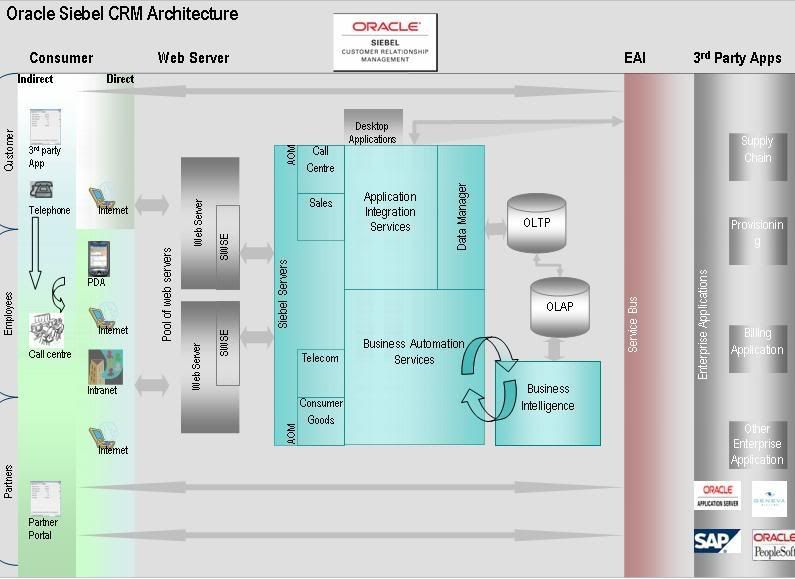
Though we treat Siebel Architecture knowledge as the very basis on which we build more knowledge, it is surprising to find many people tongue-tied when answering specific questions about it. Here is my way of doing a roundup on the Siebel architecture – which actually implies that it is simplistic, useless other than to understand what goes on at a high level and ignores all complexities. This overview is a top-down look at what happens where. The highlight of this post may be this badly prepared diagram.

Photobucket Image Hosting

Core Components

First, a look at the various components involved. To start with, consider the most prominent client of them all – a PC web browser accessing the Siebel application server situated remotely.


Web server

Siebel application, in its present form, is nothing but an application server with add-on components to provide access, report & interact with other applications. Any application server needs a web server, which is the one that frontlines user fury. Siebel application is accessed by typing an URL in the browser. The URL (for e.g.: "http://crm.myorg.com/callcenter_enu"), consists of two parts - the IP/domain name for web server itself and the Siebel Web Server Extension (SWSE) instruction. SWSE is a component installed on the web server, which is responsible for identifying Siebel requests and forwarding it to the application server. In our case, SWSE will see the user request for the call centre application and forwards it to Siebel. The Object Manager will return HTML content, which is promptly routed to the browser through web server.


Important components here are:

  • eapps.cfg – Configuration file that informs SWSE where to find the Siebel server and parameters like anonymous user details (required to display the login page), session time out parameters and the like
  • Virtual directories  – Located in SWSE logical profile directory, these folders store files required by the various Siebel applications
  • lbconfig.txt – Siebel native load balancer uses this file to recognize the various Siebel servers available and the components available on them


Aside:

  • Web servers can be load balanced using hardware or software load balancers available in the market. The load balancing architecture also can be different from installation to installation. For a Siebel application developer, this is transparent
  • Siebel itself can use native load balancing (version 7.7 onwards) or third party load balancing. While the former uses the lbconfig.txt directly, we can use the lbconfig information to write rules in case of load balancing using third party tools
  • Take a look at the web server logs, it lists lot of URLs that let us understand how requests fly back & forth. All user requests are captured here
  • Since SWSE is the gatekeeper for all user requests, it is the right place to go if we want to see the application performance in the last mile. In fact, SWSE provides a summary web page that lists the worst performing responses


Siebel Gateway (aka Name Server)

Any request forwarded by the SWSE to Siebel will pass through Siebel Gateway, which routes requests to various Siebel servers in the enterprise. A single gateway can serve multiple enterprises. Gateway keeps a tab on various Siebel servers in the enterprise and components available on the servers. This information is available in a volatile store depending on the status of various components. Requests for service will be routed to different servers based on which components are required to serve that request and where those components are able to take requests at that instant.


Important components here are:

  • siebns.dat – All configuration information of Siebel servers is stored here. Siebel servers use this file at the time of start-up to find which components they have. Periodically the non-persistent information in the volatile store is dumped to this file


Aside:

  • Gateway, though crucial, is not resource hungry
  • When Gateway goes down, users are not kicked-out but no new logins are allowed. The existing users will not be able to start any new processes that have dependency on an external component
  • siebns.dat file is notorious for data corruption, periodic backups as well as taking backups before enterprise changes will ensure a more peaceful IT team
  • Though it looks like a bunch of text, manually editing siebns.dat is not supported. If there are no backups to fall back on, "Go Tech Support!"
  • High availability is supported through resource clustering


Siebel Enterprise Server

A logical grouping of Siebel servers, Enterprise Server is not a physical entity. An enterprise server will function using a single instance of database. It is most useful to push common parameters across to various components on different Siebel servers. Remember that Gateway sends the requests to servers depending on component availability?  - well, then we don’t have anything more to deal with here.


Siebel Server

This is our guy in the group. Siebel server (more specifically one or the other Object Manager) receives user requests, pulls in data from database/from other sources, applies business logic, builds UI, merges data & UI and sends back information to requestor – whew!

Siebel server processes can be executed in interactive, background or batch mode and can be single or multithreaded. Siebel Object Manager is a component that resides in Siebel server that does most of the work. Different verticals & horizontals provided by Siebel CRM use different Object Managers, for example Call Centre OM, Sales, eService OM, etc, with each language having its own OM. That is the reason we have a "sales_enu" and a "sales_egb". Apart from this, we have OMs for external facing functions like Enterprise Application Integration (EAI). Object Managers in turn use other components in the server do execute various tasks. "Data Manager" worries about database interactions, "Assignment Manager" takes care of task allocation and so on. Components also work independent of user interactions - "Workflow Process Manager" takes care of validations & automations, "Transaction Router" & "Transaction Processor" manage remote clients and "Enterprise Integration Manager" (EIM) enables loading of external data in Siebel application.


Other Important components here are:

  • Server Request Broker (SR Broker) and Server Request Processor (SR Proc) facilitate calls between different entities in the Siebel server. SR Broker handles synchronous requests, while SR Proc handles (server initiated) asynchronous requests. Both components are capable of utilising components within the server or those on other servers. This is termed as "resilient processing"
  • Server Connection Broker is the intra-server load balancer, and manages spawning of tasks and threads of each component


Aside:

  • Calls between different entities in the Siebel server is facilitated by Server Request Broker and Server Request Processor through Gateway. All communications within Siebel space use SISNAPI or Siebel Internet Session Network API
  • Reports are not actually taken care in Siebel, rather those requests are passed on to "Actuate" reporting application. Actuate is tightly integrated to recognize Siebel data model, interact with database and produce reports
  • Interactions with Oracle Business Intelligence happen through an interface, a well-defined one at that


Clients

The common web client defined above can also be of two types:

  • High Interactivity Client – Installs and uses ActiveX controls on the client machine. Obviously, it requires Internet Explorer with suitable patches for IE and the operating system itself. Safe to consider it when the web clients reside on desktops under some degree of control
  • Standard Interactivity Client – Zero footprint, works on more browsers but UI is nothing to write about 


Web clients can bypass server in a dedicated client mode. This mode uses Siebel Repository File (SRF) on the client machine and connects directly to the Siebel database.

Web clients also can function in a disconnected mode – for that we extract data for the user from the Siebel server and provide a copy of SRF on the client machine. The data in local database then needs to be periodically synchronised with the Server.


Other than web clients, there is Siebel Handheld for phones coming under the PDA bracket. Siebel is installed on the phone device and provides field force with a way to manage Siebel data. Handheld devices can be used in a disconnected mode and later synchronised with the Siebel server – directly using http/https requests or using a PC as intermediary. Technically, any phone with a browser can be used to connect with Siebel applications, but one look at the way the application looks on the tiny screen should put such considerations to rest.


Deal with Outside World

Lot of integration gurus have a lot to say about how enterprises need to build their processes. To simplify overtly, I tend to think of all integrations as passing through the service bus. All interactions with the external systems, maybe for provisioning, billing, supply chain management etc. will involve one or the other requests flying into or out of Siebel applications through the Service Bus - out into the big bad world. Haven’t heard of Service Bus? Relax, here it just refers to any standard middleware application like Oracle Fusion, IBM Websphere and the like


What Next?

  • Refer detailed descriptions of various Siebel components in "Siebel System Administration Guide" of Siebel Bookshelf
  • Install Siebel CRM
  • Go here for a better architecture image

10 September 2008

Siebel Client-side Import - Used it yet?

Possible spoiler: Content below may be of academic interest rather than any commercial exploitation!


Most Siebel users will be familiar with "Import" and "Export" options displayed in the applet level menu in list applets. Although export is quite commonly used, import does not find many consumers. Client-side import refers to the functionality using which users, through the UI, can import data into Siebel application from a CSV file, ACT! Application export or any other defined file format.

Although we always "recommend" initiating and storing the CRM data in Siebel, that may be difficult to achieve due to logistic reasons like availability of application, disconnected mode of usage or data coming in from different sources. This gap is commonly addressed as an interface of some kind – submitting files for imports through an enterprise batch process, import using custom COM programs, interacting directly with the third-party enterprise applications etc. There are instances where allowing users to import the data quickly and start working on Siebel application may provide a better experience rather than forcing them through an enterprise EAI process running in a disconnected mode. Instantly uploading data will also enable users to connect closely with the application & assume ownership of the data. ( Hail Jargons! Anymore to add, anyone?)

Siebel out-of-the-box supports import of Contacts (according to an ambiguous statement in bookshelf that says “Siebel applications support contact business components only for client-side imports”). I am not sure how the other 25+ import objects are used, but this feature is certainly will not be on anyone’s priority list. After all, today organizations want immediate access to data from every employee and entering data in one or the other enterprise application is the norm. I did not bother to search in metalink and come out with use-cases, so do notify me if this is a repeat and I will tag this post accordingly.


Developers can easily configure components to enable Client-side import. An illustration below is an overview of enabling such an import for “List of Values”.


Enabling Client-side Import


Pre-build

  • Verify whether the applet to which the import object will be associated has “Insert” permissions for the user (May be irrelevant here – new LOVs can always be inserted right?)
  • Expose “Import Object” in the “Object Explorer” of Siebel Tools

Build - Tools

  1. Create import object in Tools - Create a new “Import Object” based on same BC as the one that you see in UI. You will not see “Import” enabled in the UI if this is not the case
  1. Create “Import Field” for all attributes that need to be imported
  2. Create relevant Import Key Field and Import Aux Field. Import Key Field acts like the “User Key”, those are the fields used to identify uniqueness of the record. Import Aux Field will provide option to re-query if there is a duplicate found
  3. Define “Import Source” to map the type of file that will be imported. This provides options to the user for selecting the type of map at the time of import
  4. For each import source, create field maps. Note that one Siebel field can be mapped to a combination of columns in the import destination 


Use

  1. Navigate to Administration – Data > List of Values. Click on Import from the applet level menu or File (from the application level menu) > Import
  2. Choose file, input format, mapping source and conflict resolution type. All fields hopefully are self-explanatory. Auto mapping allows you to do mapping on the fly, while we have defined mapping rules for predefined mapping. Since we already have created mapping in Tools, we select that without a second thought and hit on ‘Next’
  1. See the magic of mapping and hit ‘Next’ (again). This will trigger the import process. Import runs within the object manager itself (or by siebel.exe, as applicable)
  1. Review import, check log file and sign off. I had introduced a duplicate to test the functionality, which promptly got rejected

Advantages

  • Easy accessibility for the users, immediate response
  • Does not really qualify as an interface :)
  • Functionality can be configured quickly


Limitations

  • Client-side import is supported for parent business components only, no complex hierarchies, no importing of parent & children in one stretch
  • Has to be based on the same BC as the applet in UI – no ‘light’ BC concept here
  • Needs ‘debugging’ skills from the users! The error report is not exactly user friendly, except for the summary


Final Word

  • Do not forget to “Clear Cache”


Components & Version

Components realized on Siebel 8.0. There is nothing worthwhile to share here.


References

Siebel Object Types Reference, Page 199. Bookshelf for Oracle’s Siebel Business Applications Version 8.0 - B40099-02